



Your website may not be showing up on Google because your website is new, Google can’t crawl or index your website because of robots.txt or noindex, you may have a penalty on your site, you have duplicate content, or you’re not hitting search intent. Additionally, lack of SEO, algorithm updates, blocked settings on your website host, and low content value contribute to not appearing in Google search results.
Why does my website not show up on Google?
The most common reasons for why a website isn’t showing up on Google include:
| Reason | Cause | Solution |
| New website | New websites take time to get indexed and recognized by Google. |
|
| Robots.txt | URLs in your robots.txt file may be blocked, preventing Google from crawling and indexing. |
|
| Crawling issues | Google must crawl sites to add them to its index (from its index, Google can then display these sites in search results). |
|
| Indexing issues | Google must index sites to display them in search results. |
|
| Penalties | Google issues penalties to websites that aren’t compliant with its policies, like towards spam. |
|
| Duplicate content | If you have a lot of duplicate pages, Google has trouble choosing which one to show and therefore they may not show |
|
| Search optimization | Poor or missing SEO can result in low rankings or no rankings. |
|
| Algorithm updates | Google launches algorithm updates regularly, and these updates can create rapid shifts in rankings, including disappearing from search results. |
|
| Blocked settings | Many website builders have settings on the backend that block Google from crawling and indexing your website. |
|
| Low value content | If your content is low-quality, Google doesn’t have reason to cite and rank you above anyone else. |
|
Keep reading to explore these reasons more! If you’re still wondering, “why doesn’t my website show up on Google?”, the following sections will provide more detailed explanations.
Things to check when your website isn’t showing up on Google
1. New website
Is your website brand new? That’s why your site is not showing up on Google.
When a website is new, it can take a few days to a few weeks for Google to crawl and index it.
Solution
Give Google time to find your website, crawl, and index it.
2. Robots.txt file
Check if crawling issues explain why your website isn’t showing up on Google by reviewing your robots.txt file.
Google’s search engine spiders crawl your site to discover your pages and add them to its index. If it can’t crawl your site, your pages won’t appear in the search results.
Most websites have a robots.txt file. It tells search engines how to crawl your site, instructing them on which pages to crawl and which not to.
Sometimes, URLs may become blocked in your robots.txt file, preventing them from being crawled and indexed.
Solution
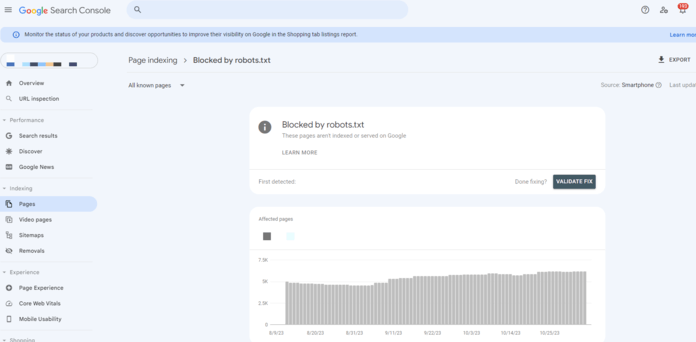
Google Search Console can help you identify pages blocked from being crawled in your robots.txt file.
Simply head to the Indexing report, navigate to pages, and then look for the “blocked by robots.txt” report to see a full list of pages that are prevented from being crawled.
It’s important to note that robots.txt files can be tricky to navigate and fix. If you aren’t experienced in optimizing robots.txt files, it’s usually recommended to contact an expert to help.
3. Noindex settings
Still saying, “Why isn’t my site showing up on Google?” Check your noindex settings to see if that’s the cause.

Another possible reason why your site isn’t showing up on Google is that you’re preventing search engines from indexing your pages.
A “noindex” meta tag is a piece of HTML code that tells search engines not to index your page. So, if you have this tag on a page that you want indexed, it won’t show up on Google, even if you submitted your sitemap.
Solution
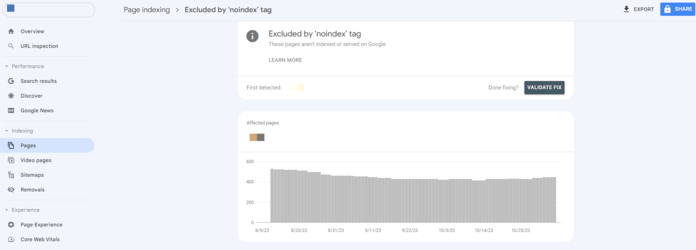
The best way to find pages with a “noindex” tag is to use Google Search Console. Google Search Console is a free tool that gives you access to tons of features and reports that help you measure your site’s search engine optimization (SEO) performance.
To find the “noindex” tagged pages, navigate to the Indexing report, click on Pages, and then look for pages “excluded by ‘noindex’ tag.”
4. Google penalties

Still thinking “why does my website not show up on Google?” Check to see if you’ve been hit with a penalty from Google. Google slaps websites with penalties when they use black-hat (or unethical) SEO practices. Such practices include:
- Buying links
- Using keyword stuffing
- Cloaking
- Duplicate content
Solution
The best strategy to avoid a Google Penalty is to follow Google’s guidelines. It seems like a quick and easy way to cheat the algorithm, but if Google catches on, it will manually prevent your site from ranking.
Tools such as Google Search Console and other third-party backlink analysis will assist in regularly monitoring and auditing your backlinks. These tools allow you to avoid suspicious or spammy links and will help you track messages, alerts and issues related to your website’s performance and alerts you of potential penalties.
“If you’re not doing your SEO yourself, make sure your provider is using ethical, white-hat techniques to boost your site in search results. If they aren’t, you’re running a serious risk you’ll get hit with a penalty that will keep you from showing up in Google search results.”

Lace Llanora
Digital Marketing Specialist

5. Duplicate content
Are you still asking yourself, “Why is my website not showing up on Google?” You could have duplicate content.
Google tends not to index duplicate content because it will take up extra space in its index that it will want to save for unique content.
As a result, Google tends to only index the page you set as canonical. If you didn’t set the page as canonical, Google will index the page it thinks is the most relevant and useful. However, this isn’t always perfect.
That means the page you intended to rank may not be indexed at all and, as a result, won’t show up in the search results or other places like Google Discover.
Solution
It’s essential to frequently check your site for duplicate content and remove it or set canonical tags on the pages you want Google to index to ensure your site appears in the search results.
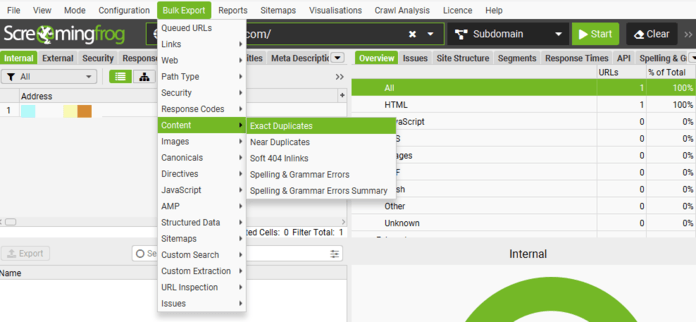
There are lots of tools that can help you find duplicate content issues. For example, you can use an application like the Screaming Frog SEO Spider to crawl all of the URLs on your site to find duplicate content.
After running your crawl, you can export all duplicate content by heading to “Bulk Exports > Content > Exact Duplicates and Near Duplicates.”
Once you’ve found all the duplicate content on your website, all you need to do is redirect or canonicalize the duplicate pages.
6. Search intent
Google aims to provide its users with websites that give them the information they want. That’s why it’s critical to ensure that your page answers users’ questions and provides them with the information and solutions they’re searching for, otherwise known as matching search intent.

If your page doesn’t match the search intent of a particular keyword, Google may not display your site in the search results for that keyword.
Solution
First, think about the keyword you’re trying to rank for. Then, search for that keyword on Google and check out the pages currently at the top of the search results to get a feel for what content users are looking for.
For example, let’s say you’re trying to rank for the keyword “best golf courses.” When you search for this keyword on Google, you’ll see results that look something like this:
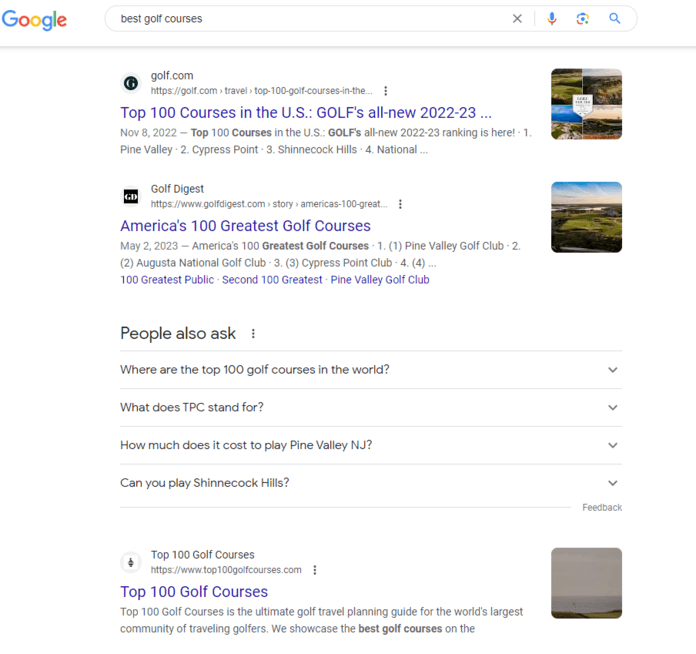
Since these results are all lists of golf courses in the US, you can reasonably conclude that users are looking for a page that lists the best 100 golf courses in America.
Your page should follow this same format to match search intent and give users the information they want. Only then will your page have a chance at ranking for that keyword.
“Hitting search intent is more important than ever in the current search landscape. If you want to rank or get cited in AI engines, your pages need to provide all the information users need. If not, your site won’t show up in Google when users search.”

Macy Storm
Content Marketing Consultant
7. Search optimizations
If you aren’t actively doing optimizations, that contributes to why you can’t find your website on Google.
It’s not enough to just publish a page and hope it shows up in search results. You need to actively optimize those pages for search engines in order to show up in results. So if you aren’t doing that, you need to in order to get your website discovered in AI search results.
Solution
The solution is simple: Start doing SEO.
You can run an SEO audit using our free SEO Checker to see where your SEO currently stands. Enter your website to receive a custom report and identify on-page, off-page, and technical SEO issues and how to fix them — or skip straight to a professional site audit if you’d rather have our team prioritize the fixes for you.
8. Algorithm updates
One final reason for your website’s not showing up on Google is that Google may have updated its algorithm. This is likely the case if your website was ranking in search results until very recently, at which point it suddenly dropped in rankings. Sometimes when Google makes a big algorithm update, it can really shake things up.
Solution
Take a moment to do some research and see if Google recently made a search update. If so, it may be that you just have to wait a bit for things to settle back into place. And if waiting doesn’t help, you should look into what the update was for. If the update was about prioritizing secure websites, for example, you should look into optimizing your website security.
It’s always a good idea to keep up with the types of changes Google makes to its algorithm because they happen every so often, and sometimes these updates impact the way your site ranks. The better you’re able to stay on top of those changes, the more you’ll be able to avoid dramatic drops in your website rankings.
9. Blocked settings
Sometimes you may not be showing up in Google results because of blocked settings. With website builders like WordPress, Squarespace, and the like, there are settings that allow you to restrict how web crawlers access or process your website.
If the settings are active, it may be leading to bots being unable to read your page content or skipping over your website, so you’re not showing up in Google.
Solution
The solution is to check on the backend of your website to ensure you don’t have any settings enabled that keep your website from getting indexed.
On WordPress, for example, there are a few areas you can check:
- Global settings in Search Engine Visibility settings
- Ensure the box labeled “discourage search engines from indexing this site” is unchecked
10. Low content value
So your website still isn’t showing up on Google, despite none of the previous reasons applying? Check that your content isn’t low value. In today’s AI search dominated world, having good, high-quality content is crucial for ranking in search results.
If your content is low quality or doesn’t offer much value, search engines don’t have a reason to rank or cite you above another page. Thin content that lacks depth won’t help you show up in Google search results.
Solution
The solution to this issue is to create better, higher-value content. This means creating content that:
- Balances quality with depth
- Includes supporting data and research
- Has citable tidbits worth extracting
- Is well structured and easy to follow
How to check if your website shows on Google
Need to check if your website is still not showing up on Google?
The quickest way to do it is to go to Google, type in “site:yourdomain.com” to see if any of your pages show up.
If nothing comes up, it indicates that your website still isn’t appearing on Google.
Another way to check is through Google Search Console.
You can log into your Google Search Console account and use the URL inspection tool to see if Google can see your URL. If you input your URL and Google can’t find it, it means it’s not showing up in Google.
Get your site on Google (and stay there)
We hope we answered your question, “Why isn’t my website showing up on Google?”
If you’ve followed these steps and are still asking “why doesn’t my website show up on Google?”, struggling to earn those higher rankings in the search results, or get your site to start ranking on Google in the first place, consider professional help.
A professional SEO agency, like WebFX (the team behind SEO.com), can help solve your SEO challenges.

SEO Services That Aren’t Cookie Cutter
Get an SEO strategy that’s tailored for your business, industry, and revenue goals.


SEO Services That Aren’t Cookie Cutter
Get an SEO strategy that’s tailored for your business, industry, and revenue goals.
Table of Contents
- Why Does My Website Not Show Up on Google?
- Things to Check when Your Website Isn’t Showing Up on Google
- 1. New Website
- 2. Robots.txt File
- 3. Noindex Settings
- 4. Google Penalties
- Lace Llanora
- 5. Duplicate Content
- 6. Search Intent
- Macy Storm
- 7. Search Optimizations
- 8. Algorithm Updates
- 9. Blocked Settings
- 10. Low Content Value
- How to Check if Your Website Shows on Google
SEO Services That Aren’t Cookie Cutter
Get an SEO strategy that’s tailored for your business, industry, and revenue goals.
Writers